 3
3 3
3 6
6 3
3 6
6 4
4 3
3 3
3 3
3 2
2 6
6 3
3 3
3 3
3 3
3 3
3 3
3 3
3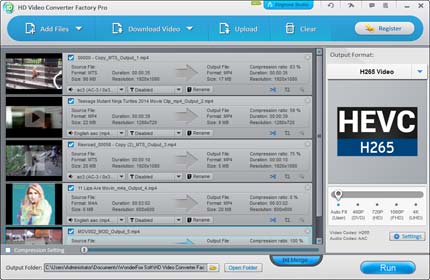
Wonder Fox 3 in 1

HD Video Converter Factory Pro
HD Video Converter Factory Pro ist mit modernster High-Definition (HD) Video-Konvertierung-Technologie ausgestattet.
Es kann Videos von Standard-Definition (SD) zu High-Definition (HD) wie HD MP4, HD MKV, AVI HD, HD MTS, HD TRP, auch 4k-Standard konvertieren und ermöglicht es, die Größe des Videos ( Konvertieren von HD-Videos auf SD-Videos) zu reduzieren.
Diese HD-Konvertierungs-Software unterstützt die neuesten Codecs H265 (HEVC), VP9 und über 200 Video-Formate.
Es kann fast alle populären Videos für praktisch jedes Videoformat mit SD-Video, HD-Videos konvertieren, zum Beispiel die Umwandlung Multi-Track-HD-Video M2TS, MKV, AVCHD, HDTV BDAV und MPEG-TS und einer breiten Palette von weiteren populären Video-und Audio-Formaten.
Genießen Sie Filme oder Videos jederzeit überall auf jedem Gerät. Alle High-Definition-und HD-Camcorder Videos können auf tragbaren und Konsolenplayer, wie iPad, iPhone, Samsung Smartphone oder Tab, Kindle Fire, Nexus, Android, Nokia, Blackberry, Sony und jeder mehr abgespielt werden.
Neben den leistungsfähigen Konvertierungsfunktionen, unterstützt HD Video Converter Factory Pro auch Multi-CPU und Hyper Threading.
Es bietet bis zu 50-facher Echtzeit-Video-Konvertierungs-Geschwindigkeit.
++++++++++++++++++
DVD Video Converter
DVD Video Converter ist die beste Wahl. Es bietet aus einer Hand die Komplettlösung zum rippen von DVDs (von Disney, Paramount, Sony, etc.), konvertieren von Videos, Online-Videos herunterladen und bearbeiten und abspielen von Filmen / Videos mit hervorragender Leistung.
Es unterstützt die neuesten NVIDIA CUDA, Intel Quick Sync, Multi-Core-CPUs, Batch-Modus und einzigartige Kodier-Technologie, die die Umwandlungs-Geschwindigkeit 30-50X schneller macht.
Sie können sogar den DVD und Video-Konverter auch für das Herunterladen von Online-Videos von YouTube, Facebook, Vimeo, Liveleak, Metacafe und anderen populären Video-Websites verwenden.
Ferner ist ein DVD-Video-Player eingebaut, der für die Wiedergabe nahezu aller Arten von Audio- und Video-Dateien, auch DVDs und HD-Video verwendet werden kann.
++++++++++++++++++
Video Watermark
Add Watermark to Protect Your Video Copyright with Fast Watermarking Speed & 0 Quality Loss!
* Fully Protect Video Copyright
* 150+ Free Watermark materials
* Accurately Control Watermark via Timeline
* Brand Your Video with a Watermark
* Text and Image Watermark Supported
* Support to Convert and Edit Video Files
Video Watermark focuses on protecting your video copyright and preventing unauthorized use of the videos you share on your social media and blog.
Have you ever had the similar situation?
It takes several hours making a video.
You share it on social media and finally find your own video has been put on another Person’s name.
So you may need to add identity and ownership information to your video, ensuring that viewers know the source.
Video Watermark is a full-featured video watermarking program but definitely easy to use.
The video watermark software allows you to embed text, image, logo, sign (including animated images) to your video in super-fast batch mode.
Video Watermark has simple operation, friendly interface and high speed process, so the processing of watermarking becomes very easy and fast.
You can finish it with a few clicks, and you do not need to wait for a long time, it is an excellent solution to protect and annotate your video.
Protect Your Video with Digital Watermarks:
Many popular online video websites allow visitors to view any of the video content that their members have uploaded.
With some technical supports, visitors can also download whatever they like. Thus, the original works you shared might be used without your consent in a way that you never wanted to do. Even though it is hard to deter video thief, you still can watermark your original videos to build brand awareness. Let others know original maker of these awesome works.
Create Dynamic Watermark and Subtitle Effects:
“Add Key” function in WonderFox Video Watermark allows user to make dynamic watermark in a more flexible way.
Just create different points (more than two) on the timeline and set different parameters for each point. Then, you will see watermark’s transition effect from one point to another one.
For example:
Set a key point on third second and set “Opacity”=100%, then set another key on eighth second and set the “Opacity”=0%, you will see fade-out effect of watermark from third second to eighth second.
You can make different sorts of dynamic effects of watermarks via the time line, such as scrolling subtitle, revolving icon, etc.
Enhance Your Videos – Make Them Stunning:
Video Watermark lets you create kinds of crazy visuals (special effects) to enhance your video.
It is extremely easy for you to adjust the brightness, contrast and color balance of video.
You can also personalize your video by applying the following effects:
Old Film, Mosaic, Blur, Noise, Emboss, etc, making it stunning.
Add Watermarks to Videos in Batch:
Still feel troublesome to process watermarked videos one by one? With the help of WonderFox Video Watermark, you can process all videos you have edited at the same time in the batch mode.
It will save you a great deal of time and energy.
Convert All Key Videos to Various Formats:
Worried about watermarking videos in different formats? Never mind!
Video Watermark well supports all popular video formats, including AVI, MPEG, WMV, MP4, MKV, 3GP, RM, FLV, SWF, etc.
It also enables user to convert your files to any of the following formats:
AVI, MPEG, WMV, MP4, MKV, 3GP, RM, FLV, SWF, etc. Now just feel free to upload your video to YouTube and MySpace.
Flexible parameter settings - The default value is suitable parameter for each format, you can also change the parameters according to your needs.
- Eingetragen
- 15.06.2016
- Kinostart
- nicht angegeben
- Größe
- 106,81 MB
- Kategorie
- Appz — Windows
- Passwort
- 2016.DqzucT-iT.2016