 3
3 3
3 6
6 3
3 6
6 4
4 3
3 3
3 3
3 2
2 6
6 3
3 3
3 3
3 3
3 3
3 3
3 3
3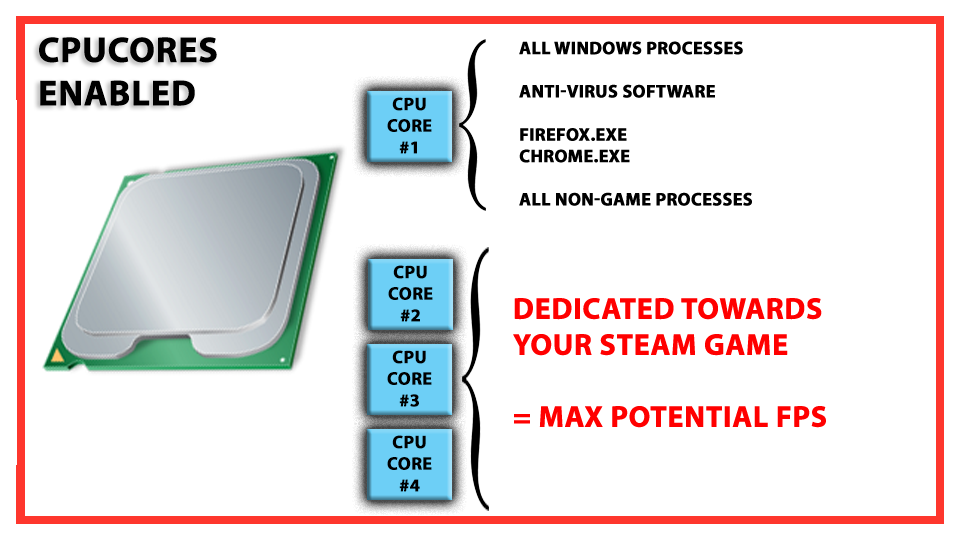
CPU Cores 1.5.0

CPUCores is a cutting-edge Windows based software built by gamers, specifically for gamers, with 1 thing in mind: INCREASE YOUR FPS!
CPUCores does this by micromanaging your Windows OS and non-essential applications to focus your CPU power for 1 thing:
Want more FPS? Order CPUCores Now!
Automatic Steam Game Integration
CPUCores automatically detects all your Steam games. CPUCore's power is 1 click away!
Steam Grid Integration
CPUCores
Easily select your Steam games via Grid Mode!
Easily Search Your Steam Games!
CPUCores
CPUCores supports full Steam game searching!
Supports All Other Games + Applications
CPUCores
Simply select any other game or application
These are our favorite games that you can increase FPS with CPUCores
Show more games optimized by CPUCores!
Using CPUCores:
From HDD:
Set it up in 3 easy steps
Install CPUCores
Locate your favorite game
Launch the game
How does CPUCores increase FPS?
Normal PC Usage (Without CPUCore Application)
By default (without CPUCores):
Your OS works to balance CPU energy consumption, power efficiency, and heat generation, with the end result being that a default Windows OS will often balance CPU consumption across all your cpu core processors, little by little. For example, if you look at your Windows Task Manager right now, you will likely see CPU usage between 2-20% across all of your processor cores. This is great for keeping all your cpu cores relatively cool as well as be more efficient with regards to energy consumption. However, this is at the cost of CPU POWER when gaming!
The End Result:
Your are at the mercy of how your PC decides to mix and match Windows processes, misc. applications, and your games. This will inevitably lead towards a reduced performance potential that your PC hardware could offer up for your game to use.
CPUCore Application - Turbocharging Games
What CPUCores Does:
The CPUCores application identifies dozens of Windows programs, background processes, and non-gaming applications, and immediately controls and isolates them to a subsection of your total CPU resources. CPUCores will then free up a block of CPU resources and dedicated it specifically for a game. You can then launch a Steam game, or any game/program, directly via the CPUCores application. This enables CPUCores to control the processor usage for that game/program and ensure it has dedicated usage to processing cores. Your game no longer has to share resources with the OS / other applications.
The End Result:
For single-threaded games: Before the application may have had 70-90% access to a CPU processor, it now has near 100% access to a processor. This enables your game to take full advantage of your CPU core, thus enabling it to reach it's highest FPS potential on your system. The net benefit can be up to 30% more CPU power for that game!
For games that operate on 2 cores (or more): Your game can now have unlimited access to all the remaining cores on your system without any sharing of CPU access to your core Windows installation or other applications on your PC.
But wait, what about processors with Hyper-Threading?
As we all know, the majority of games will be slowed down when using hyperthreading. This is due to the fact that 1 normal core + 1 hyperthreaded core is effectively still 1 core. 2 normal cores offer twice the processing power as 1 core + 1 hyperthreaded core.
The CPUCore's application is fully aware of Hyper-Threading. It intelligently detects and assigns your game to dedicated cores, and not hyperthreaded cores, thus giving your game maximum CPU power!
- Eingetragen
- 01.05.2016
- Kinostart
- nicht angegeben
- Größe
- 9,54 MB
- Kategorie
- Appz — Windows
- Passwort
- 2016.ZeucT-iT.2016